
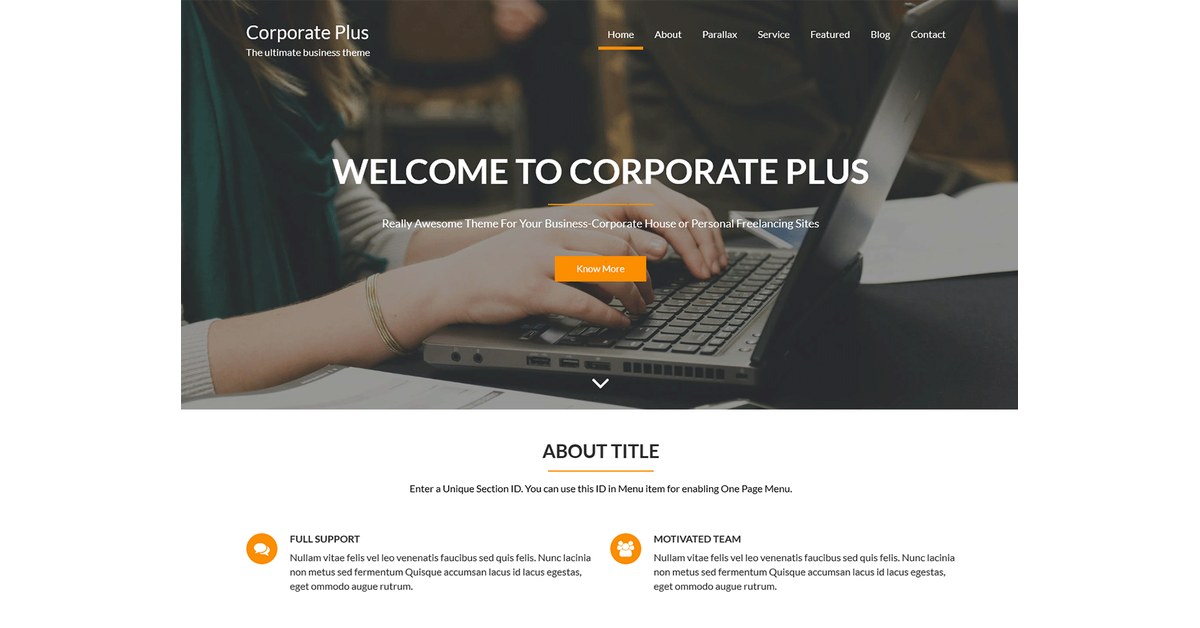
Corporate Plus Pro: Change Default Slider Text in WordPress
Are you wondering about how to change the default slider text on the Corporate Plus theme?
It’s simple, please follow the steps below:
- Go to the admin menu
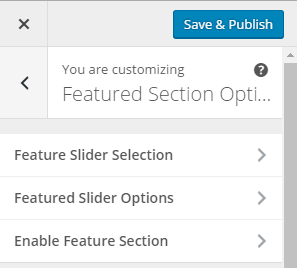
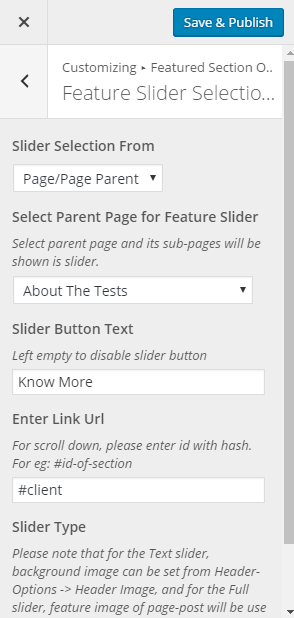
- Go to Appearance > Customize > Featured Section Options > Featured Slider Selection
- And select the options from the drop-down from ‘Slider Selection From’
- If you select ‘Page/Page Parent’, child pages of that selected parent page will display a slider.
- If you select ‘Recent Post’, the recent post will display as a slider.
- If you select ‘Category’, the post of that specific category will display as a slider.
- If you select ‘Custom’, create your own custom slider with title, content, and Image with a link.
- You will see the changes preview on the right side.
- Click on the save and publish button to save the changes.
Did you find the article Helpful? Please post your comment below. If you have any questions, please post them on the support forum.
Last updated for 2026. This article is reviewed annually to keep the information accurate and current. For the most up-to-date WordPress guidance, bookmark this page or subscribe to our newsletter.
Wrapping Up
This guide covered the essentials of Corporate Plus Pro: Change Default Slider Text. For ongoing coverage and the latest corporate plus pro: change default slider text tips, subscribe to the Acme Themes newsletter or follow us on social media. Have a specific question about corporate plus pro: change default slider text? Drop a comment below — our team reads and responds to every query within 48 hours.
Last updated: June 2026. Reviewed for accuracy against WordPress 6.5+ core.
If you have questions or need further assistance, feel free to leave a comment below or reach out via our contact form. Our team reviews every query and is happy to help. We regularly update our tutorials to reflect the latest WordPress core changes, plugin updates, and best practices. For more in-depth guides, browse our related posts in the sidebar or visit the WordPress.org documentation for the official reference.
Can I not change the text where it says “Welcome to Corporate Plus” on the free version?
yes, open Welcome to Corporate Plus page on click “know more” button and change title of page, thats all
Hi – There is no drop down from the feature slider selection link. There is a box that says select but it only goes to pages.
Hello Randy,
Please contact on our support forum http://acmethemes.com/supports Our dedicated support team will answer you.
Thanks
Pleas check this video, this is very helpful for you. https://www.youtube.com/watch?v=LViaxKyuIro&t=34s
I just bought Pro version of Corporate Plus Pro and designing my Home Page.
I cant change of bottom slider in page of home, please can you help me?
Hi Irwing,
Could you please provide us with the URL of your site?
Thanks
not able to see this option please help
Hey,
Clicking the know more button does not direct to where to change “Welcome to Corporate Plus”. I have tried it, rather it directed me to the acme theme site. It’s not working and it’s frustrating. Can some one please provide a helpful guide? Thank you.
Is it possible in the free version to have the “Learn More” button direct to my about page or does it have to direct to the “Welcome to Corporate Plus” page?
I cannot get rid of the startup-slider.jpg image on the home page – Lesley. net
Hello Lana,
From the Dashboard go to Appearance => Customize => => Featured Section Options => Enable Feature Section
and uncheck the check box
After I change the text the header image changed back to the default image and I cant change it back… does anyone know how to solve this?